
Introduction

Processing Diagrams


The diagrams contained in this section are provided to be referenced by those persons who will be responsible for developing and maintaining online applications. They are organized in a sequence to be most useful to a developer who is doing customization to generated MMP's and MBP's.

It is advisable for the developer to familiarize him/herself with the overall processing logic of the generated programs before undertaking customization. Gaining a familiarity with them can be done by reviewing the Cobol program listings produced by the compiler. Reading the section of this manual titled Analysis of the Generated MMP will also be helpful in understanding the online MMP's.

The generated online programs (MMP's) each typically supports nine standard functions, plus any custom functions the developer might have added. The logic diagrams depict not the physical structure of the MMP's, but the logical structure for each of the various standard functions. They emphasize, not the Cobol paragraph names, but the customization insertion point names through which the processing flows. Thus, you will notice, any given insertion point name might appear in several diagrams. The cross-reference chart included in the front of the Insertion Points section of this manual will help you to see which insertion points are applicable to which functions.

The generated batch report programs (MBP's) are typical internal-sort processes utilizing an input procedure to read, join, and select data to be reported; a standard Cobol SORT verb, and an output procedure which produces a report. Multiple (up to nine) levels of break logic are supported.

This diagram structure is intended to be useful to the developer who is customizing generated applications and wishes to decide which insertion points are appropriate for his/her particular desired modifications. They are not to be confused with "flow charts" of the programs. A flow chart would involve a greater level of detail and would necessarily combine all program functions into one chart. This distinction is important to recognize since a change made in any given insertion point might well affect several different functions. The developer should refer to the cross-reference chart to resolve any questions regarding the potential (unexpected) impact of making changes at a given insertion point. The text of the Insertion Points section includes a detailed discussion of each insertion point.

It should be noted that when the automated logical join processes are used, MAGEC will generate "custom" coding which is inserted automatically into certain of the insertion points; therefore, you may notice coding in some insertion points (i.e. %JOIN and %DATADEF) even before you have done any customization of your own. This scheme allows you to access and modify the generated join logic, just as you can access and modify any other custom coding.

If you have generated an SQL application, there will be customization automatically generated in many of the insertion points which do database access. This coding consists mainly of EXEC SQL statements and it can be modified by you, if you wish.

If you are using MAGEC in GUI mode, these diagrams are available online in either the development or debugging phases. The narrative descriptions and instructions from the Insertion Points chapter are also available by clicking on the insertion points.

The flowcharts below are more than just images, you can click on almost any object shown and will see a pop-up tooltip that gives an explanation. Many of the tooltips also include a link to an even more thorough narrative in another chapter of this documentation. If you leave the flowchart using those links, the back button (←) will return to it.


SEE Function

SEE Function logo
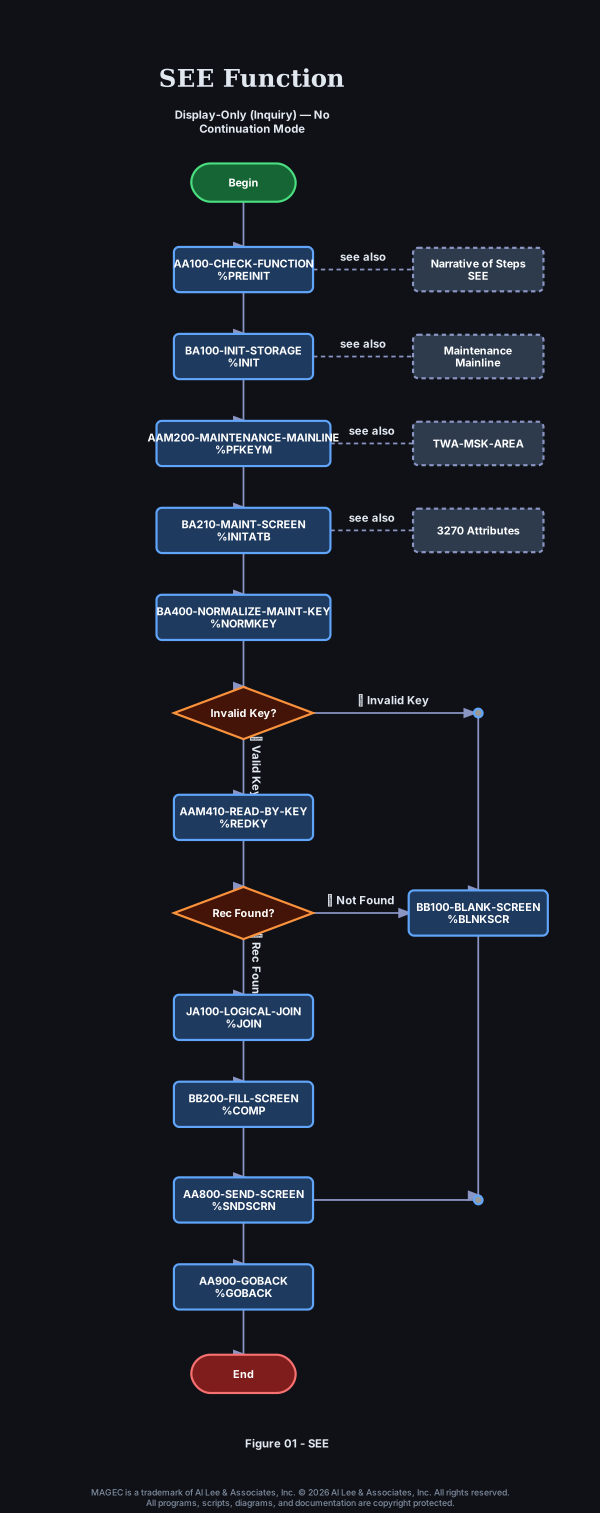
Begin AA100-CHECK-FUNCTION %PREINIT Narrative of Steps SEE BA100-INIT-STORAGE %INIT Maintenance Mainline AAM200-MAINTENANCE-MAINLINE %PFKEYM TWA-MSK-AREA BA210-MAINT-SCREEN %INITATB 3270 Attributes BA400-NORMALIZE-MAINT-KEY %NORMKEY Invalid Key? AAM410-READ-BY-KEY %REDKY Rec Found? JA100-LOGICAL-JOIN %JOIN BB200-FILL-SCREEN %COMP BB100-BLANK-SCREEN %BLNKSCR AA800-SEND-SCREEN %SNDSCRN AA900-GOBACK %GOBACK End

Figure 01 - SEE Function


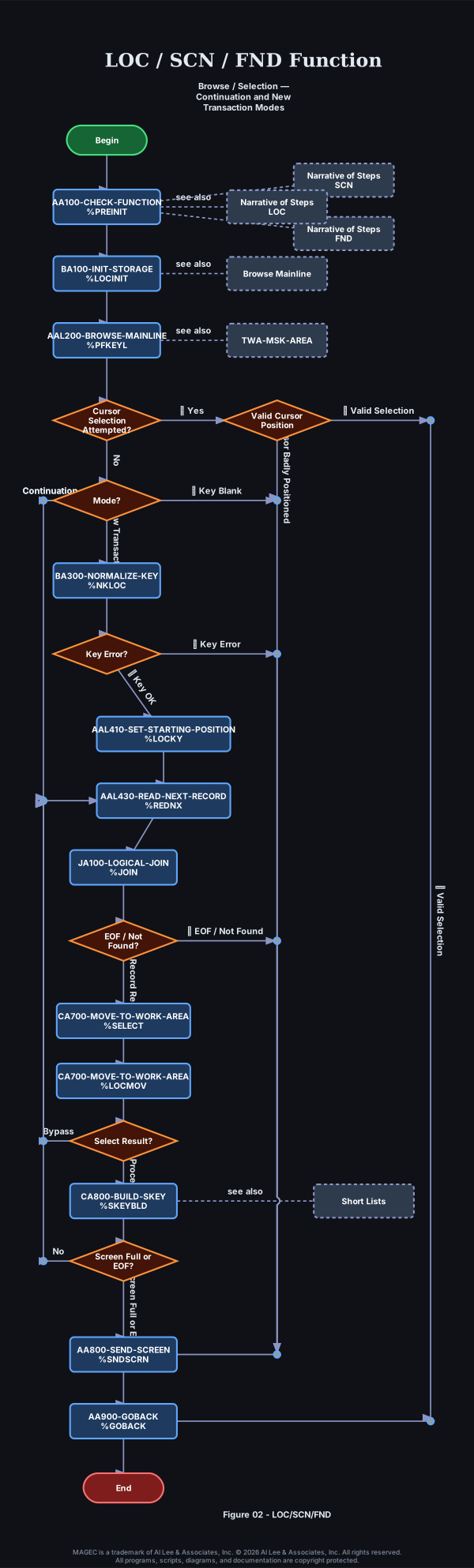
LOC/SCN/FND Functions

LOC / SCN / FND Function logo
Begin AA100-CHECK-FUNCTION %PREINIT Narrative of Steps SCN Narrative of Steps FND Narrative of Steps LOC BA100-INIT-STORAGE %LOCINIT Browse Mainline AAL200-BROWSE-MAINLINE %PFKEYL TWA-MSK-AREA Cursor Selection Attempted? Valid Cursor Position Mode? BA300-NORMALIZE-KEY %NKLOC Key Error? AAL410-SET-STARTING-POSITION %LOCKY AAL430-READ-NEXT-RECORD %REDNX JA100-LOGICAL-JOIN %JOIN EOF / Not Found? CA700-MOVE-TO-WORK-AREA %SELECT CA700-MOVE-TO-WORK-AREA %LOCMOV Select Result? CA800-BUILD-SKEY %SKEYBLD Short Lists Screen Full or EOF? AA800-SEND-SCREEN %SNDSCRN AA900-GOBACK %GOBACK End

Figure 02 - LOC/SCN/FND Functions


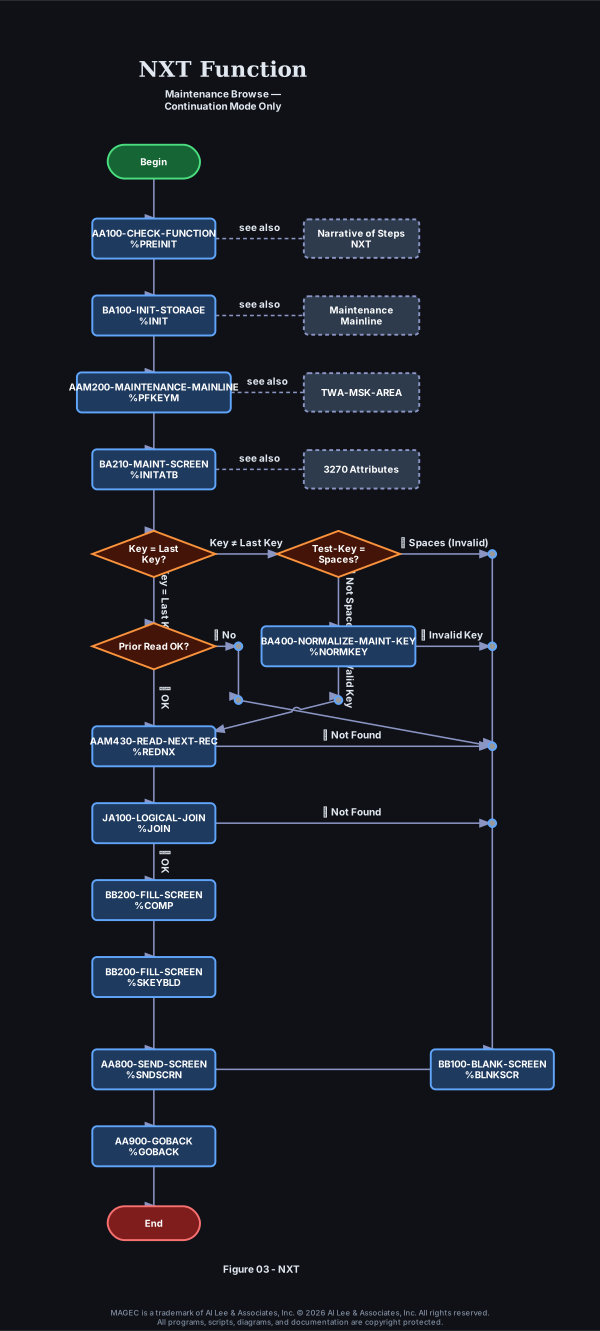
NXT Function

NXT Function logo
Begin AA100-CHECK-FUNCTION %PREINIT Narrative of Steps NXT BA100-INIT-STORAGE %INIT Maintenance Mainline AAM200-MAINTENANCE-MAINLINE %PFKEYM TWA-MSK-AREA BA210-MAINT-SCREEN %INITATB 3270 Attributes Key = Last Key? Prior Read OK? Test-Key = Spaces? BA400-NORMALIZE-MAINT-KEY %NORMKEY AAM430-READ-NEXT-REC %REDNX JA100-LOGICAL-JOIN %JOIN BB200-FILL-SCREEN %COMP BB200-FILL-SCREEN %SKEYBLD BB100-BLANK-SCREEN %BLNKSCR AA800-SEND-SCREEN %SNDSCRN AA900-GOBACK %GOBACK End

Figure 03 - NXT Function


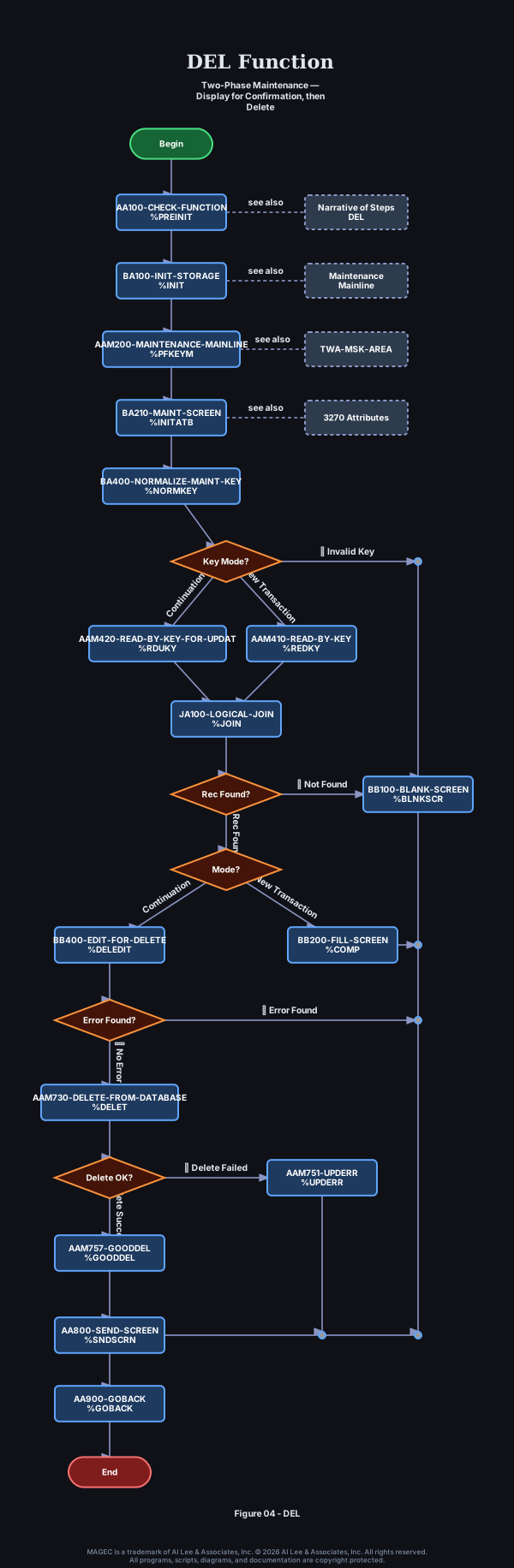
DEL Function

DEL Function logo
Begin AA100-CHECK-FUNCTION %PREINIT Narrative of Steps DEL BA100-INIT-STORAGE %INIT Maintenance Mainline AAM200-MAINTENANCE-MAINLINE %PFKEYM TWA-MSK-AREA BA210-MAINT-SCREEN %INITATB 3270 Attributes BA400-NORMALIZE-MAINT-KEY %NORMKEY Key Mode? AAM410-READ-BY-KEY %REDKY AAM420-READ-BY-KEY-FOR-UPDAT %RDUKY JA100-LOGICAL-JOIN %JOIN Rec Found? Mode? BB200-FILL-SCREEN %COMP BB400-EDIT-FOR-DELETE %DELEDIT Error Found? AAM730-DELETE-FROM-DATABASE %DELET Delete OK? AAM751-UPDERR %UPDERR AAM757-GOODDEL %GOODDEL BB100-BLANK-SCREEN %BLNKSCR AA800-SEND-SCREEN %SNDSCRN AA900-GOBACK %GOBACK End

Figure 04 - DEL Function


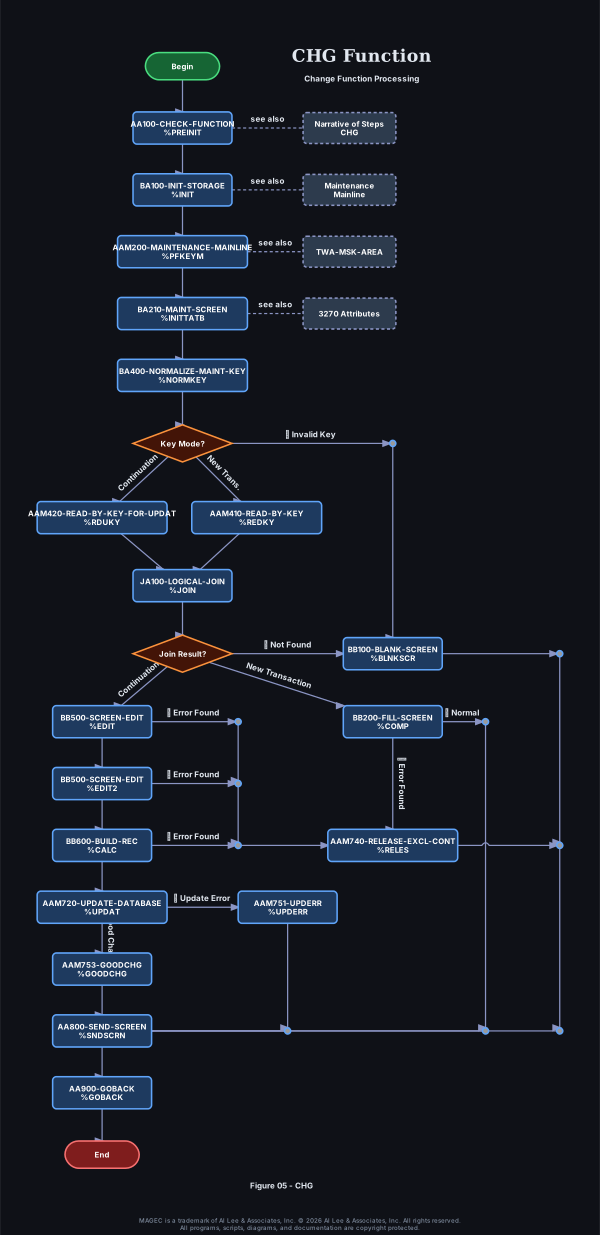
CHG Function

CHG-Function logo
Begin AA100-CHECK-FUNCTION %PREINIT Narrative of Steps CHG BA100-INIT-STORAGE %INIT Maintenance Mainline AAM200-MAINTENANCE-MAINLINE %PFKEYM TWA-MSK-AREA BA210-MAINT-SCREEN %INITTATB 3270 Attributes BA400-NORMALIZE-MAINT-KEY %NORMKEY Key Mode? AAM410-READ-BY-KEY %REDKY AAM420-READ-BY-KEY-FOR-UPDAT %RDUKY JA100-LOGICAL-JOIN %JOIN Join Result? BB200-FILL-SCREEN %COMP BB500-SCREEN-EDIT %EDIT BB500-SCREEN-EDIT %EDIT2 BB600-BUILD-REC %CALC AAM720-UPDATE-DATABASE %UPDAT AAM753-GOODCHG %GOODCHG AAM751-UPDERR %UPDERR AAM740-RELEASE-EXCL-CONT %RELES BB100-BLANK-SCREEN %BLNKSCR AA800-SEND-SCREEN %SNDSCRN AA900-GOBACK %GOBACK End

Figure 05 - CHG Function


ADD/DUP Function

ADD-DUP-Function logo
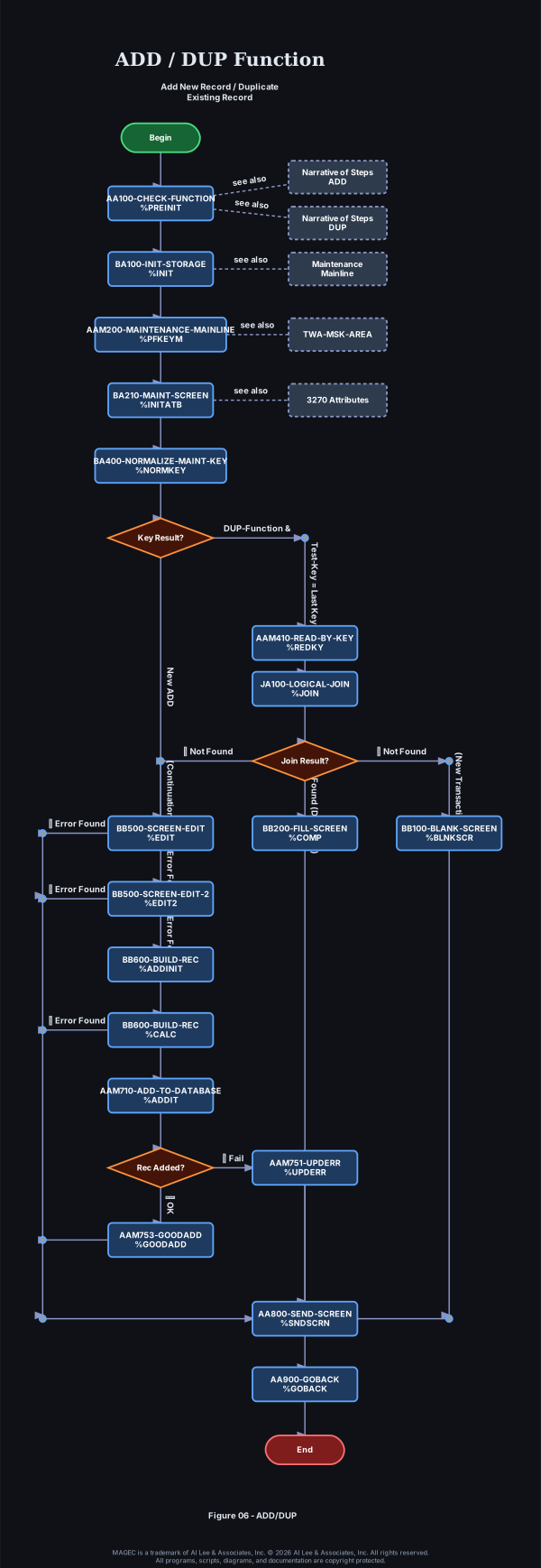
Begin AA100-CHECK-FUNCTION %PREINIT Narrative of Steps ADD Narrative of Steps DUP BA100-INIT-STORAGE %INIT Maintenance Mainline AAM200-MAINTENANCE-MAINLINE %PFKEYM TWA-MSK-AREA BA210-MAINT-SCREEN %INITATB 3270 Attributes BA400-NORMALIZE-MAINT-KEY %NORMKEY Key Result? AAM410-READ-BY-KEY %REDKY JA100-LOGICAL-JOIN %JOIN Join Result? BB100-BLANK-SCREEN %BLNKSCR BB200-FILL-SCREEN %COMP BB500-SCREEN-EDIT %EDIT BB500-SCREEN-EDIT-2 %EDIT2 BB600-BUILD-REC %ADDINIT BB600-BUILD-REC %CALC AAM710-ADD-TO-DATABASE %ADDIT Rec Added? AAM753-GOODADD %GOODADD AAM751-UPDERR %UPDERR AA800-SEND-SCREEN %SNDSCRN AA900-GOBACK %GOBACK End

Figure 06 - ADD/DUP Function


MBP's Input Procedure

MBP INPUT PROCEDURE logo
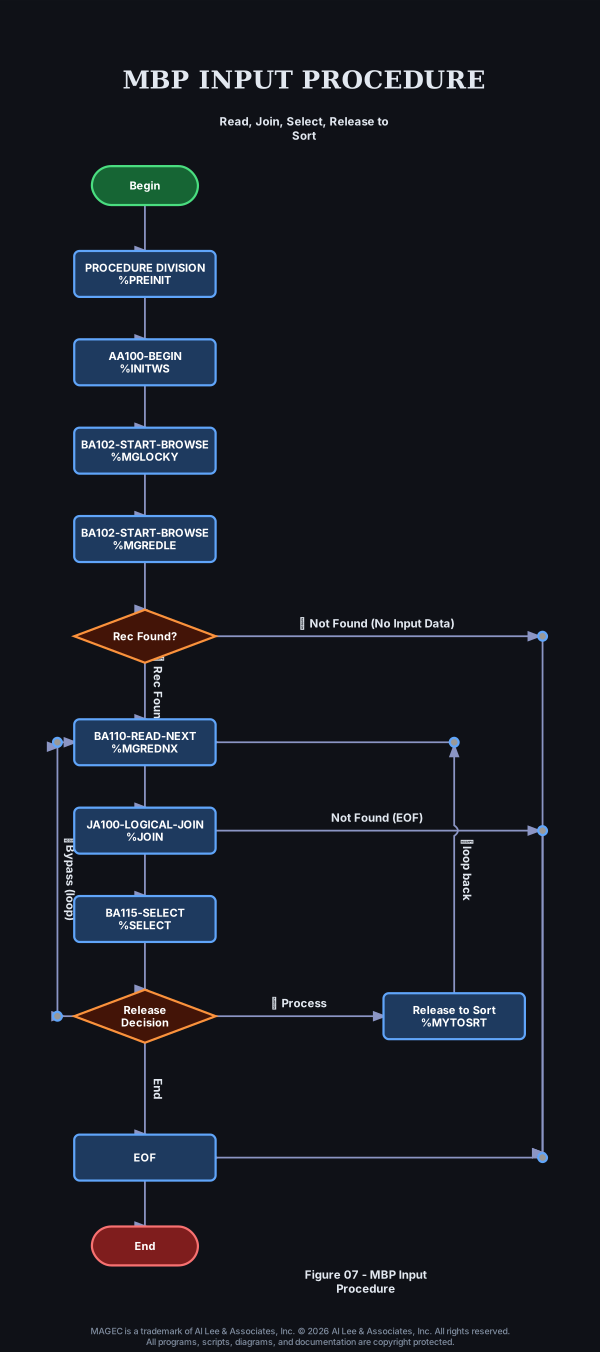
Begin PROCEDURE DIVISION %PREINIT AA100-BEGIN %INITWS BA102-START-BROWSE %MGLOCKY BA102-START-BROWSE %MGREDLE Rec Found? BA110-READ-NEXT %MGREDNX JA100-LOGICAL-JOIN %JOIN BA115-SELECT %SELECT Release Decision Release to Sort %MYTOSRT EOF End

Figure 07 - MBP's Input Procedure


MBP's Output Procedure

MBP OUTPUT PROCEDURE logo
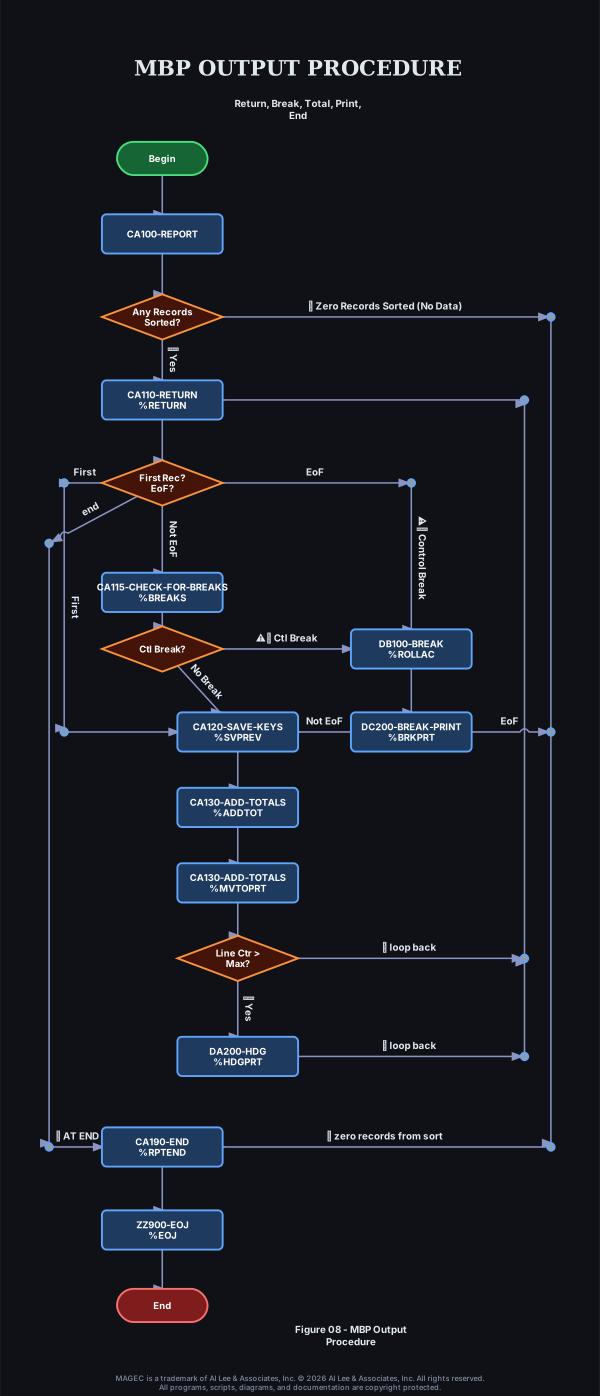
Begin CA100-REPORT Any Records Sorted? CA110-RETURN %RETURN First Rec? EoF? CA115-CHECK-FOR-BREAKS %BREAKS Ctl Break? CA120-SAVE-KEYS %SVPREV CA130-ADD-TOTALS %ADDTOT CA130-ADD-TOTALS %MVTOPRT Line Ctr > Max? DA200-HDG %HDGPRT DB100-BREAK %ROLLAC DC200-BREAK-PRINT %BRKPRT CA190-END %RPTEND ZZ900-EOJ %EOJ End

Figure 08 - MBP's Output procedure